2026 Year-End Technology Upgrades for Small Businesses
Clients, friends, and family frequently ask me which technology and tools I recommend, especially at the end of the year. Sometimes they want to know which monitor I pack when I travel. Other times, it’s a business owner trying to figure out whether Google Ads or SEO generated the calls that kept the sales team busy last month.
This year, I decided to put my top 2026 recommendations in one place. While not all of these recommendations may apply to your situation, I hope that you find at least one useful tool to explore.

As you plan for 2027, think about a problem you or your employees have worked around all year. If a two-second power flicker can take your office offline, I’d start with a battery backup. If you’re about to renew a sizable advertising budget, I’d start with lead tracking. In this article, I cover my top year-end upgrades I encourage you to consider.
Table of Contents
Keep Your Business Running Through Interruptions
Think about what would happen at your office if the power went out for ten minutes or your team suddenly lost access to its shared files. Those are two disruptions you need a plan and technology in place to handle, especially if several employees depend on the same equipment to get their work done.
Put Your Internet Connection and Desktop Computers on Battery Backup
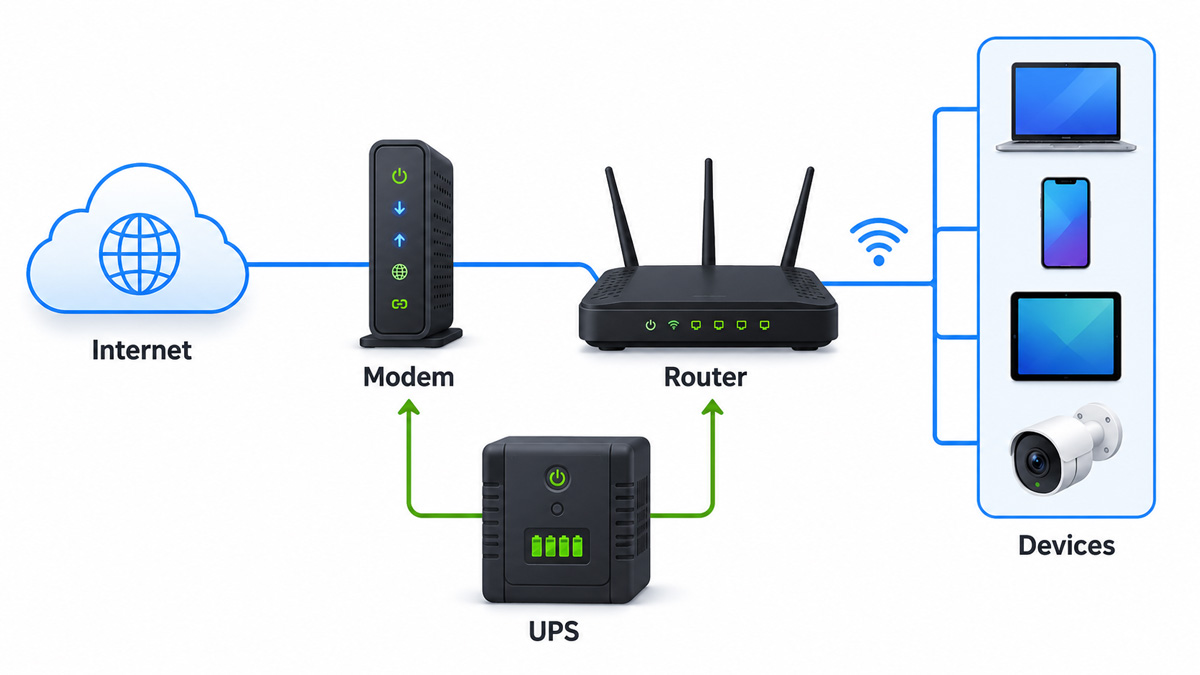
If your laptop stays on during a power outage but your modem and Wi-Fi router reboot, you’ll still drop off your video call or lose access to your cloud software. A UPS (uninterruptible power supply) can keep those devices powered through a brief outage, provided your internet provider’s equipment upstream stays online. If you have fiber internet, remember the optical network terminal (ONT). If the ONT loses power, keeping the router on won’t preserve your internet connection.
At Igniting Business, the CyberPower CP1500PFCLCD is my favorite for our office network equipment. We also use that model for higher-powered computers. For a desktop, I’d size the UPS for the computer and at least one monitor so you can see your work, save it, and shut down well before your battery runs out if it’s an extended outage. We have written several relevant guides that cover battery backup for a modem and Wi-Fi router, protecting desktop computers, and battery backup for a fiber ONT.
Reconsider What You Need From an Aging File Server
Before you get a quote for another traditional server, find out what the current one actually does. If most of its job is storing and sharing files and running backups, a network attached storage (NAS) device may be a better fit. If it also runs your accounting software or another business application, check what that application requires before planning a switch. We’ve tried several NAS brands over the years and use Synology at Igniting Business. Here’s how I’d compare a NAS with a traditional server.
If you already own a Synology NAS, consider upgrading the backup routine. Synology’s Hyper Backup is one of my favorite tools for scheduling copies to a separate, offsite destination (another NAS or your favorite cloud storage services). Think of the timely customer estimate someone saved over on Friday. Could you retrieve Thursday’s version? Before year-end, try restoring one file to a temporary folder. If you don’t have this functionality, my guide to replacing a Windows server with a Synology NAS shows the backup options.
Get More Out of the Equipment You Use Every Day
Some of the upgrades I appreciate most are the ones I use every time I sit down to work. Having enough screen space to keep multiple related steps in view and an ergonomic mouse that fits my hand makes a difference I notice throughout the day.
Give Yourself Room to Work Across Multiple Monitors
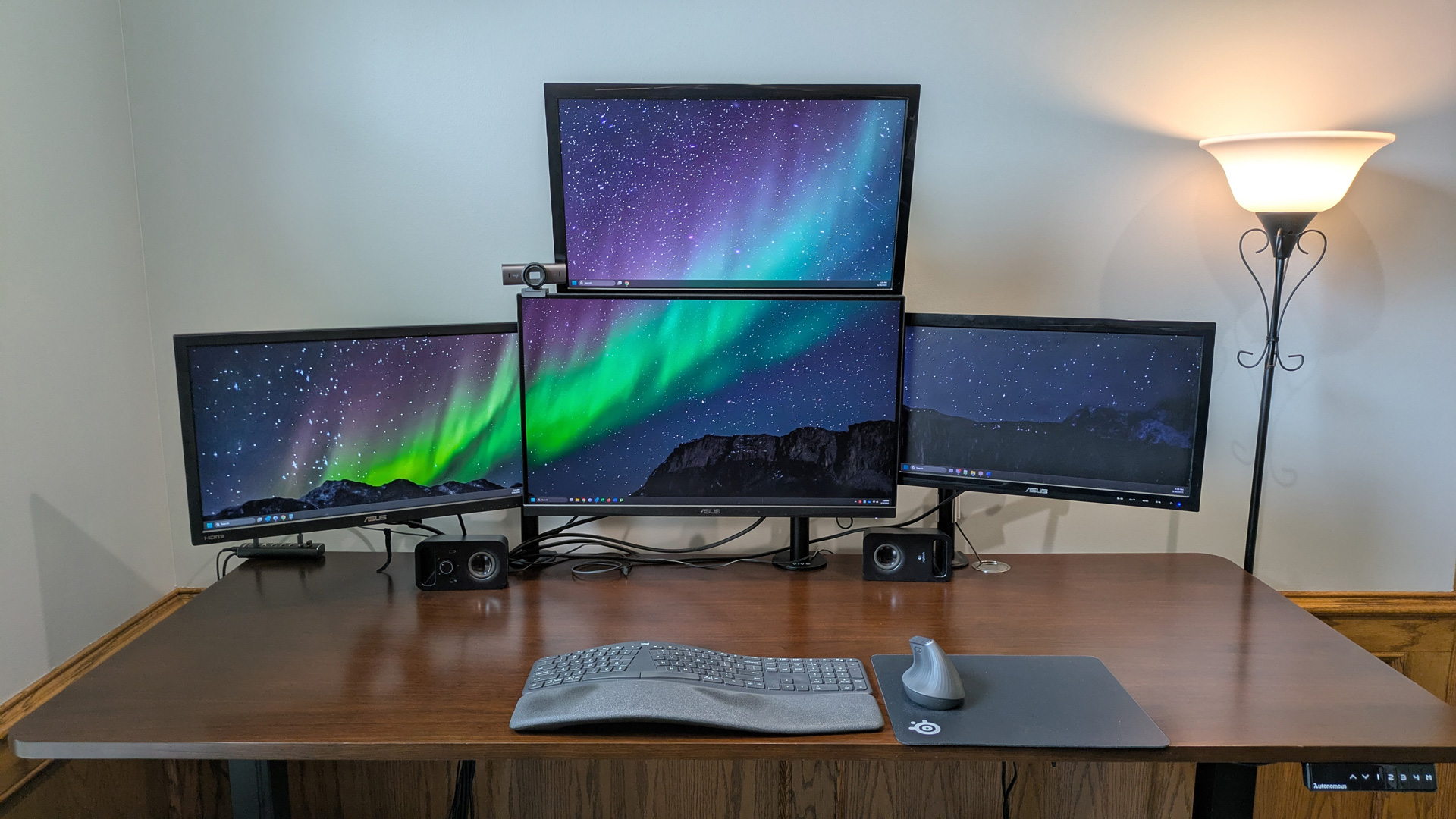
If you’ve ever switched back and forth between a customer’s email, the estimate you’re preparing, and the onsite photos your teammate captured, you already know what you’d pull up on multiple screens. I started with two monitors over a decade ago and eventually worked my way a four-monitor setup that I absolutely love. In web design, for instance, I can keep the client’s requested changes in view while I edit a page and check how it looks in a browser on multiple screen sizes. The number that makes sense for you depends on what you regularly need to see at the same time.
Before buying monitors, check how many external displays your computer supports, what ports you have, and how much desk space the stands will occupy. I also love quality monitor arms because I can line up screens of different sizes and set each one at a comfortable height. My guide to setting up multiple monitors walks through those decisions.
A portable monitor is the version of this upgrade I appreciate most when traveling. I’ve used an ASUS ZenScreen in hotels and rental properties, and two of my teammates have used one as well. With my setup, one USB-C cable from the laptop handles both power and video. That’s one less power brick to pack and one less outlet to find. I’ve written about using a portable monitor with a laptop and how to connect and configure multiple monitor setups.
Try a Vertical Mouse That Fits Your Hand
I switched to a vertical mouse in 2021 and use the Logitech MX Vertical for work and play. The tilted shape lets me hold it with my hand turned slightly on its side in an angle that’s more comfortable for my hand and shoulder for long-term use. One feature I appreciate in design work is the pointer speed adjustment. I can move quickly between monitors, then press the button on top to slow the pointer for a precise edit in Photoshop or Illustrator.
I’ve also used the smaller Logitech Lift. Hand size is one of the first things I’d check before choosing between them, especially if you’re buying one for someone else. My vertical ergonomic mouse guide includes a sizing chart and explains what took some getting used to.
Upgrade The Tools You Use to Manage Your Marketing
Before you set next year’s marketing budget, consider where you’re still guessing and which tasks take too much of your valuable time. I’d start with tools that show how customers find you, which efforts bring in business, and where you can save time managing your social accounts.
Find Out Which Campaigns Generate Qualified Leads
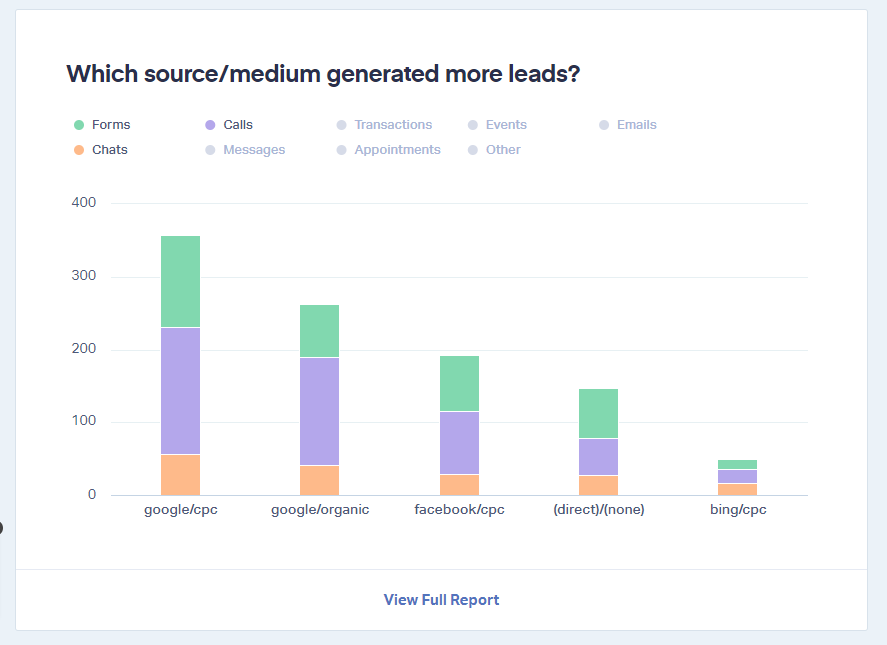
If you spend money on several marketing channels, can you tell which one generated your last five qualified leads? We use WhatConverts to connect leads with the marketing sources that brought those customers to the website. I’d set it up before your 2027 campaigns launch so you have that information when it’s time to decide what to renew.
For one of our construction clients, we tracked both website form submissions and incoming phone calls. The client spent more on Google Ads, yet SEO produced significantly more qualified leads. They paused their Google ads, put more of their budget into SEO, and maintained a high volume of quality leads while spending less overall. Naturally, your results may point in a different direction. However, you’ll never know which direction you should be going unless you track the results effectively. Here’s how we track leads across marketing channels.
Track Search Rankings and the Questions Customers Ask AI Tools
A business owner who searches Google from their office may see one company near the top of the results. Given Google’s Proximity Bias, would a customer two ZIP codes away see the same companies in the same order? If you serve several geographic markets, target the most important zip codes and cities to see how you’re ranking for your target keywords. Our guide to tracking keyword rankings by city and ZIP code shows how to do that.
AI prompt tracking answers a related question. For example, if someone asks an AI assistant, like ChatGPT or Gemini, to recommend a commercial HVAC contractor in your city, which companies does it mention? Various tracking tools can run selected (simulated) prompts repeatedly so you can look for patterns. I’d pay attention to competitors or sources that appear consistently over time. Here’s how I evaluate keyword rankings and AI prompt tracking alongside actual leads.
Make Social Media Easier and Less Time Consuming to Manage
If getting one update out to your audience means logging in to three different social media platforms, consider a social media management tool. For example, we use Zoho Social which lets you prepare posts in batches and schedule them across accounts. You can also keep track of all comments and messages across platforms in one centralized system, saving you loads of time when engaging with your audience. Our guide to social media management tools covers scheduling, design, and collaboration.
Make Your Website Work Better for Customers
One year-end exercise I recommend is pulling up your website on your phone and trying to do something a customer would do, like browsing project photos or booking an appointment. Bring anything that slows you down to your web developer, along with a question that’s harder to answer from the outside: how well is the site protected?
Speed Up Delivery of Images, Videos, and Other Files
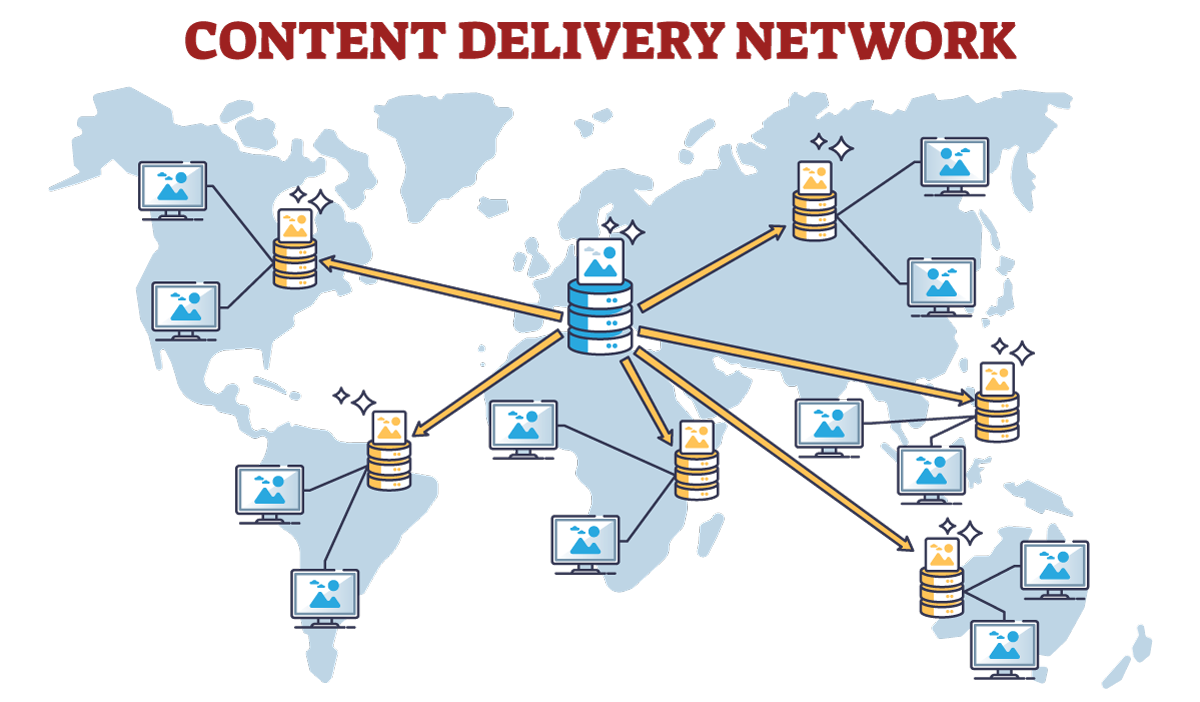
If a project gallery loads quickly at your office but slowly for customers across the country or internationally, ask your web developer whether a content delivery network (CDN) would help. A CDN can serve copies of images and other files from a location closer to the visitor. First, check whether your hosting or website platform already includes a CDN and whether your images are appropriately sized. An oversized project photo is worth fixing wherever it’s delivered from. Learn how a CDN works and when it can help a small business website.
Let Visitors Book Appointments While They’re on Your Website
Imagine a prospect visiting your site at 8:00 PM, ready to schedule a consultation. How many phone calls or emails will it take before both calendars agree? Instead, use a tool like Calendly, Acuity, or Zoho Bookings to show available times on your website. One of our clients, Collision Resources, lets prospective customers schedule a personalized software demo online, streamlining lead scheduling.
If your team spends time going back and forth by phone or email to schedule a particular kind of meeting with prospective clients, that’s the one I’d make available for online booking first. See examples of websites that handle everyday business tasks.
Review How Your Website Is Protected
One question I hear from owners is why anyone would bother trying to hack their small business website. Automated scans can find a vulnerable plugin without anyone knowing your company’s name. Before the holiday break, ask whoever maintains your site three questions. Who applies critical updates? Who receives and investigates security alerts? How often is my website backed up offsite (outside of my web hosting account)? Discover why website hack attempts have drastically increased in 2026 and seven ways to improve your website’s security.

Decide Whether a Redesign Belongs in Your 2027 Budget
If customers struggle to request a quote on their phones, your navigation still lists services you’ve stopped offering, or your team dreads updating the site, get those problems down on paper. That list will help you decide when a website redesign makes sense. If you decide to budget for one, identify who will write the copy, supply the photos, and connect any booking or e-commerce tools. Those decisions are among the factors that affect website design prices, and you can work through them well before development begins.
Get More Tech Upgrade Tips on a Monthly Basis
Don’t wait until the end of the year to think about upgrades. If you’d like more firsthand recommendations like these, subscribe to the free Igniting Business newsletter. Each month, we share practical web design, SEO, and marketing tips for small business owners.
At no additional cost to you, we may receive a commission if you click on some of the links on this website and make a purchase.