How to Import Google Analytics 4 (GA4) Data into Ahrefs Web Analytics
In late December 2024, Ahrefs Web Analytics rolled out a highly requested feature to allow importing data from Google Analytics 4 (GA4) into Ahrefs Web Analytics, as announced on their Canny feature request tracker and later on social media.

We haven’t seen any formal documentation on how to “enable” this feature, so wrote this quick article to help out users wanting to take advantage of this feature.
Table of Contents
Steps for Importing Google Analytics 4 Data into Ahrefs Web Analytics
According to Ahrefs, importing GA data is now available and simply requires you to “connect your Google Account within Ahrefs project settings.”
You can connect your Google Account by navigating to Account Settings (selectable under your username in the upper righthand corner), click Integrations, and select Link Google Account. Follow the onscreen steps to complete the Google account authorization.
However, if you’ve been using Ahrefs for a long time like us, you likely already connected your Google account years ago to take advantage of other features. Surprise! Ahrefs proactively imported your Google Analytics data for any existing Ahrefs Web Analytics profiles within your account.
How to View the Google Analytics 4 Data within Ahrefs
Use the following steps to access the imported Google Analytics data:
- To see the historical data, navigate to your desired website property within Ahrefs Web Analytics.
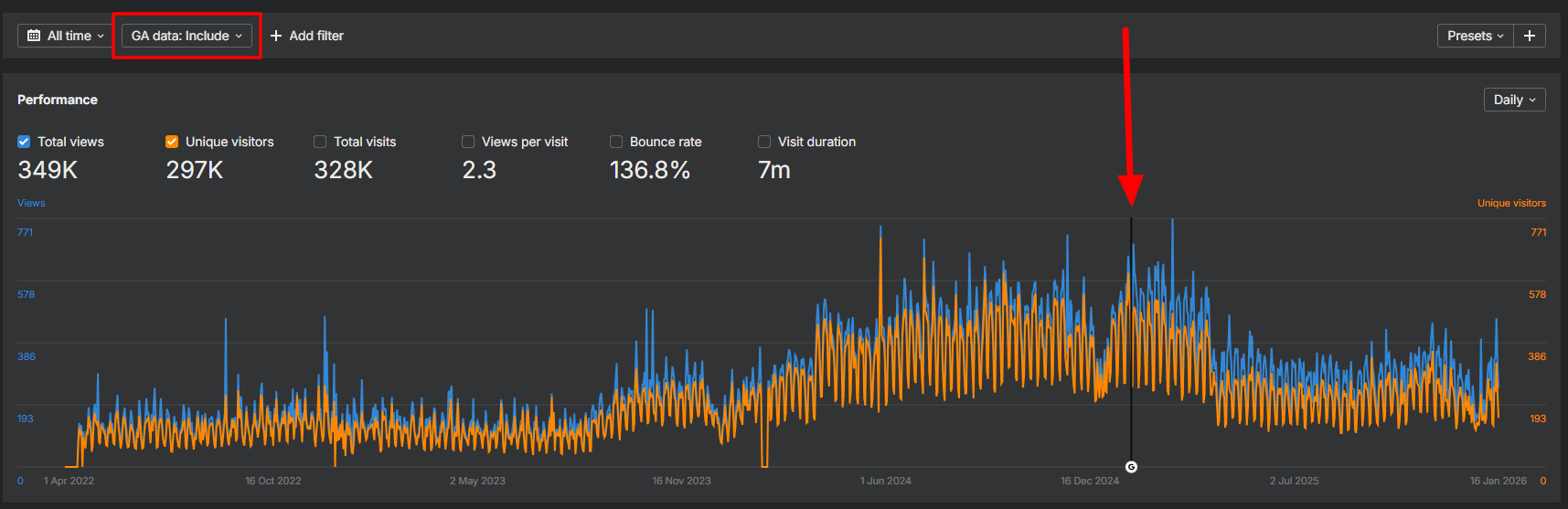
- Click the toggle at the top left of the screen that says “GA data: Exclude” and change it to “GA data: Include”

- You will not see additional data yet if your date range filter is set to last 30 days (default). As such, you should click on the date range picker and select “All Time.”
This will then display the data collected by Ahrefs Web Analytics and historical data from Google Analytics 4 for dates before you installed Ahrefs Web Analytics.
Ahrefs will indicate the switch from historical GA4 data and Ahrefs data with a vertical line and Google icon (shown when daily view is selected). If you hover over the tooltip, it provides your switchover date and states “Data before this point is imported from Google Analytics. After that, it's tracked natively by Ahrefs Web Analytics.”
Believe it or not, that’s all you need to get started.
As with any data import feature between two unique systems, not all data will transfer. Additionally, Ahrefs may calculate certain information, like bounce rate, differently than Google's default systems. So, take any imported data with a grain of salt and measure of grace.
If this post was helpful to you, consider subscribing to our free monthly newsletter packed full of other digital marketing, web design, and SEO tips.