What Is Business Agent in Google Merchant Center?
Google is continuing to add AI-powered experiences directly into search results, and one newer feature e-commerce businesses should know about is Business Agent which is deployable from within Google Merchant Center.
Business Agent is an AI-powered conversational experience on Google Search that allows shoppers to chat with your brand. Google describes Business Agent as a virtual associate that can answer product questions in your brand’s voice and connect with customers during important shopping moments to boost sales.
Note that this should not be confused with Microsoft’s Brand Agent, which is a different product entirely.

Business Agent is currently free, appears within Google Search, and gives potential customers another way to engage with your business before they ever click through to your website. From our experience setting up Business Agents for our ecommerce clients, Business Agent is definitely worth testing for ecommerce business.
Table of Contents
How Does Business Agent Work?
Business Agent is an AI-powered chat experience connected to your Google Merchant Center account and merchant brand profile.
When someone searches for your brand on Google and your merchant brand profile appears, shoppers may be able to click a Chat option and ask questions about your business or products.
Business Agent provides answers based on product and brand information stored in Google Merchant Center, along with information from your company’s website.
In other words, Business Agent is designed to act like a digital shopping assistant for your brand within Google Search.
A shopper might use it to ask questions such as:
- What is this product made of?
- Help me compare products.
- How fast do these products ship?
- How can I contact customer support?
For e-commerce businesses, this creates one more opportunity for your brand to stand out within Google search, answer questions, reduce hesitation, and move shoppers closer to making a purchase.
Where Does Business Agent Appear?
Business Agent can appear when users search for your brand within Google Search.
That distinction matters because the interaction happens inside Google Search, not on your website. A potential customer may be able to learn more about your products, ask questions, and engage with your brand before clicking through to your store or clicking to connect with your own live chat system.
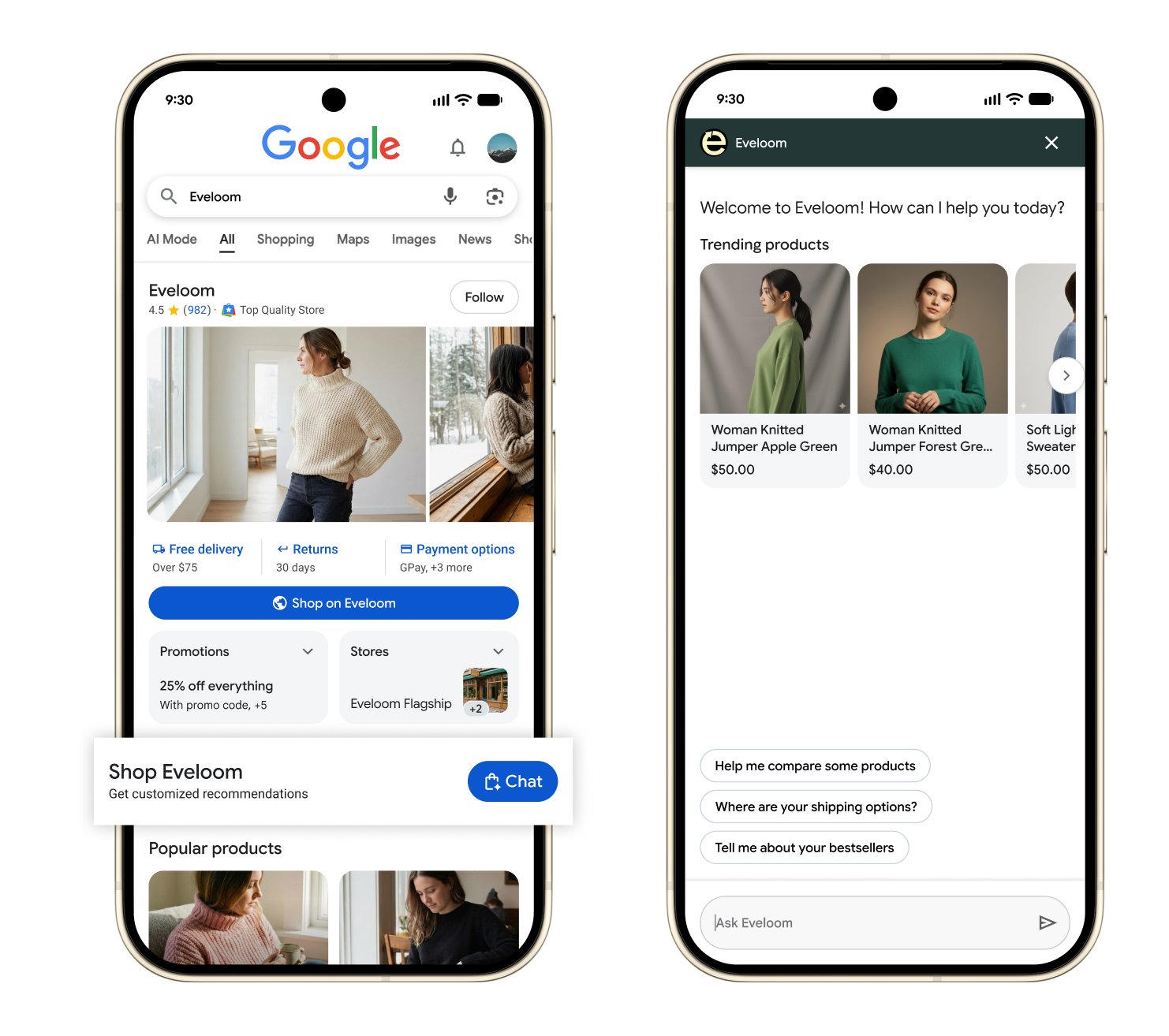 Image is courtesy of Google Support
For small business owners, this is another reminder that your Google presence is not just a doorway to your website. In many cases, it is becoming a large part of the customer experience itself.
How Does Business Agent Get Information About Your Company?
Business Agent uses information connected to your Google Merchant Center account, your product data, and your business website. Business Agent uses Gemini models to analyze information from your Merchant Center account and additional business data, including your website, to provide conversational responses to customer questions.
That means its answers may be influenced by:
- Your Merchant Center account information
- Your product feed
- Product titles and descriptions
- Pricing and availability
- Brand information from your claimed brand profile
- Product feed data synced from ecommerce platforms, such as Shopify
- Content Google can analyze from your website
This is helpful, but it is also something ecommerce businesses need to take seriously.
Ensure Your Product Data and Policies Are Accurate
If your product feed is accurate, your website content is clear, and your product details are complete, Business Agent has better source material to utilize. If your feed has outdated information, vague product descriptions, missing sizing details, unclear shipping policies, or inconsistent return information, the answers may be less helpful.
Fear of inaccurate information or hallucinations does not mean ecommerce businesses should avoid the feature. It simply means Business Agent is another reason to keep your Merchant Center data, website content, product descriptions, shipping information, return policy, and customer support information up to date.
Who Is Eligible to Use Business Agent?
Business Agent is currently tied to Google Merchant Center, so this feature applies specifically to ecommerce businesses.
To be eligible to customize Business Agent, Google says your business must meet the following requirements:
- Have a US-based ecommerce store
- Have a verified Google Merchant Center account
- Have at least 50 approved offers
- Have a claimed Brand Profile
If your business does not sell products online through an e-commerce system, this feature does not apply to you right now.
However, if you are an ecommerce business and already use Merchant Center or are open to using Merchant Center, Business Agent is worth configuring.
How to Get Business Agent in Google Merchant Center
If your business is eligible, you can access Business Agent through Google Merchant Center.
Google’s current instructions are:
- Go to your Google Merchant Center account.
- Under Marketing, select Business Agent.
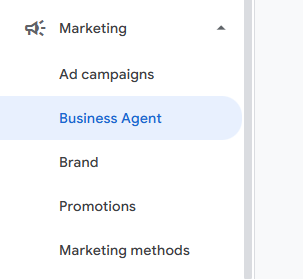
- If you don’t see Business Agent listed under Marketing, you may not be eligible or have not yet claimed your Brand Profile.
- Under How your Business Agent appears, select Customize.
- Update your Business Agent settings as desired.
- Save your changes.
- Select Save and turn on customized agent.
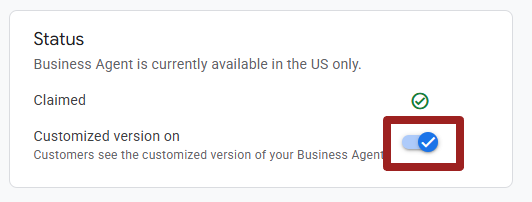
Keep in mind that a standard Google-branded version of Business Agent may be shown to customers until you complete customization within Google Merchant Center.
Business Agent Customization Options
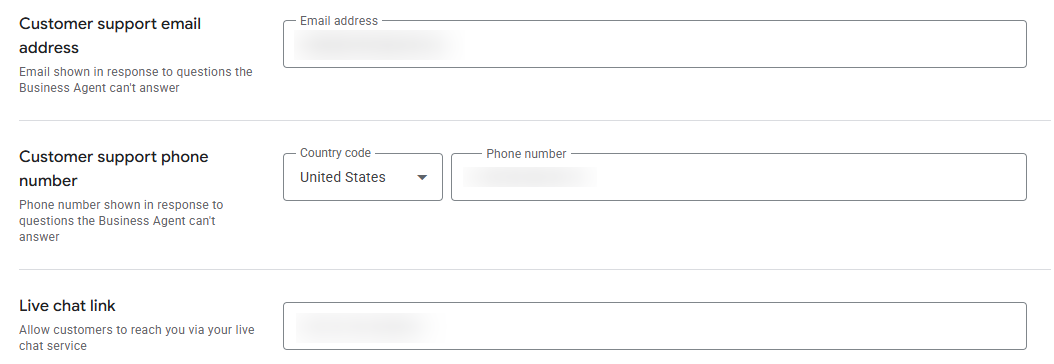
Business Agent currently offers several customization options to help the experience better match your brand.
The support info and live chat link options are especially important. AI can be useful, but it should not be the only path for a customer who needs help. Make sure shoppers can easily reach your actual support channel when Business Agent cannot fully answer their question.
Don’t forget to fill out this section!
What Features Are Coming Next to Google’s Business Agent?
Business Agent is still early, and Google has indicated that more features are coming.
According to Google, future capabilities are expected to include the ability to train your agent further using business data such as brand guidelines, services, and size guides. Google also mentions that performance insights and agentic checkout are coming soon.
Those upcoming features could make Business Agent more useful over time, especially for ecommerce businesses with detailed product catalogs, sizing complexity, or frequently asked pre-purchase questions.
Should Ecommerce Businesses Set Up Business Agent?
In most cases, yes. If your ecommerce business is eligible, Business Agent is worth setting up.
The biggest reasons to setup Business Agent are simple:
- Business Agent is free. There is no additional cost to test the feature while in early access.
- Business Agent creates another engagement opportunity in Google Search. A customer who is unsure about your product may ask a question instead of leaving the search results altogether or clicking on a competitor’s details.
- This type of AI-powered search interaction is likely to become more common. Setting it up now can help your business become more familiar with how these experiences work before they become a larger part of online shopping behavior.
That said, do not treat Business Agent as a “set it and forget it” feature. Make sure your product data, website content, and support information are accurate. Also, review the experience periodically so you understand what shoppers may see when interacting with your brand.
Agents Have Arrived and Cannot Be Ignored
Business Agent is part of a much larger trend: platforms are rapidly adding AI agents directly into their ecosystems.
For small business owners, this means your website and social media are no longer the only place where customers may interact with your business information. Customers may increasingly ask questions through Google, shopping platforms, AI search tools, maps, and other third-party systems.
That makes your source data more important than ever.
Your product feed, website content, business listings, brand profile, FAQs, shipping policies, return information, and customer service details all help shape how your business is represented online. The more accurate and complete that information is, the better positioned your business will be as these AI experiences continue to evolve.
As more platforms roll out AI agents and conversational search features, business owners and their marketing teams will need to closely monitor where and how their business information appears online.
Stay Updated on New Features
Do you want to stay up to date on more changes like this? Sign up for the free monthly Igniting Business newsletter for practical digital marketing, SEO, and small business technology updates.